Designer · AV system design
Draw it once. The paperwork follows.
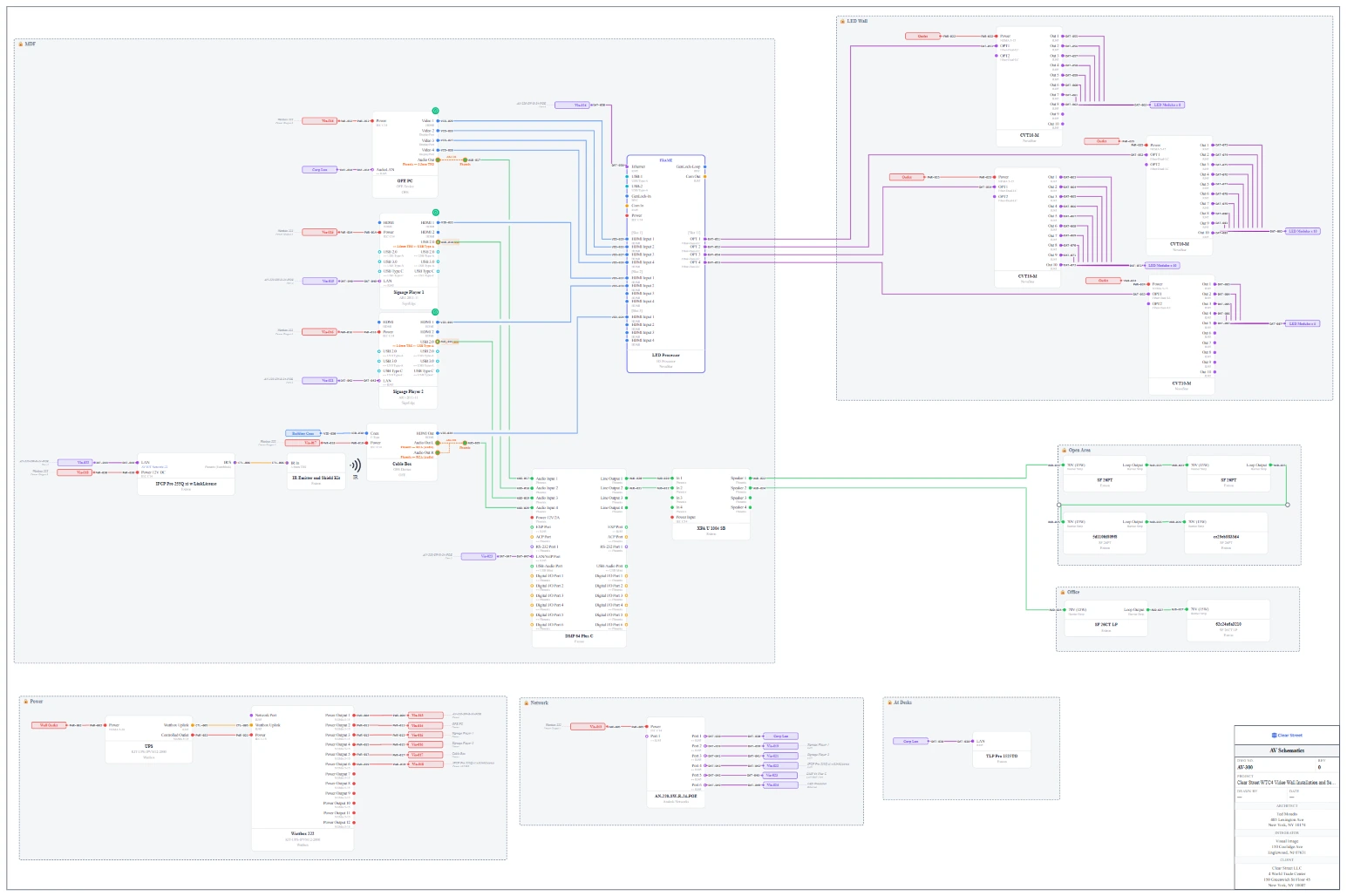
Wirings Designer is AV system design software for integrators: signal-flow drawings, rack elevations, and the BOM from one canvas, with AI for the tedious parts.
- No credit card required
- SOC 2 in progress
- SSO available on Enterprise
- Projects per org
- Unlimited
- Releases, last 90 days
- 175+
- Drawing auto-routing
- Real-time
- Tenant data isolation
- Per customer
Twenty seconds
Scope in. Every drawing out.
A wire diagram from a scope of work, racks that do the math, and every sheet after that.
Product library
2,168 products, already drawn.
Real manufacturer products with their ports, connectors and drawings, checked before they're published. Drop one on the canvas instead of drawing it.
- Products
- 2,168
- Manufacturers
- 52
- Categories
- 24
AI that knows AV
An engineer built in. Not a chatbot bolted on.
- AI-01
Design with AI
Scope of work in, wiring diagram out.
- AI-02
Project Assistant
Has read every drawing and ticket.
- AI-03
It remembers
Tell it once. The whole team benefits.
- AI-04
AI in the library
Datasheet in, port map out.
The long version
See it move
Two minutes on Projects.
Product tour
The real thing, not a mock-up.
Capabilities
Built the way integrators work.
Drawing & docs
- Auto-routed signal flow
- Cable schedules
- Rack elevations
- Patch bays
- Revision clouds
- PDF packages
- DWG / DXF / Visio import
Block library
- Major AV manufacturers
- Custom blocks
- AI port maps
- Bulk import
Project & team
- Drawing locks
- Database-enforced roles
- Wire numbering
- IP plans
- Passcode share links
Integrations
- ConnectWise two-way
- REST API + webhooks
- SAML / OIDC SSO
- Per-tenant deployment
Shipping velocity
175 releases in 90 days.
Every one of them is live today.
Aug 2026
The AI month- Project AI Assistant
- Patch Bay drawings
- Wire pull check-off
Jul 2026
Field & documents- Cover & spec pages
- One-PDF drawing packages
- Orthogonal wire routing
Jun 2026
Import everything- DWG / DXF / PDF backgrounds
- Excel & Sheets import
- Daily field reports
ConnectWise PSA
Two-way sync
Crestron CP4-R
Block library
Cisco Webex
Block library
Q-SYS
Block library
Extron DTP
Block library
QuickBooks
Coming soon
Pricing
Pick the tier that fits your team.
14-day free trial on every plan. Cancel before it ends, pay nothing.
Starter
For small AV teams
or $3300 / yearsave 8%
- Up to 5 users
- Unlimited projects & Opportunites
- Build your own Block library + custom blocks
- Excel import only (NO live linking to any CRM)
- Unlimited Shares
- Email support
- One included 2 hour training session (Additional available @ $150/hr)
- 14-day free trial
Growth
AV Teams with CRM integration: up to 10 users
or $5500 / yearsave 8%
- Everything in Starter
- Up to 10 users
- Sync to an external CRM (Connectwise PSA, ...)
- Priority support
- 14-day free trial
- Access to a symbol library maintained by Wirings.io
Enterprise
For large integrators and national accounts — unlimited users
or $8250 / yearsave 8%
- Everything in Growth
- Unlimited users
- SSO + SCIM provisioning
- Dedicated tenant infrastructure
- Custom block library imports
- Dedicated onboarding + CSM
- Annual contract available
Prices in USD. Bill monthly or yearly — pick at checkout; cancel anytime from the billing portal.
Compare every feature, side by side
| Capability | Starter $300 / mo · $3300 / yr | Growth $500 / mo · $5500 / yr | Enterprise $750 / mo · $8250 / yr |
|---|---|---|---|
Team & capacity Users | Up to 5 | Up to 10 | Unlimited |
| Projects & opportunities | Unlimited | Unlimited | Unlimited |
| Shares | Unlimited | Unlimited | Unlimited |
Blocks & symbols Build-your-own block library + custom blocks | |||
| Wirings-maintained symbol library | |||
CRM integration Excel import | |||
| Live CRM sync (ConnectWise PSA, …) | |||
| REST API + webhooks | |||
Identity & infrastructure SSO (SAML / OIDC) | |||
| SCIM provisioning | |||
| Dedicated tenant infrastructure | |||
| Audit logs | 30 days | 1 year | Unlimited |
Support & training Email support | |||
| Priority response (SLA) | Next business day | 4 hours | |
| Included onboarding training | 1 × 2-hour session | 1 × 2-hour session | Dedicated onboarding |
| Additional training | $150/hr | $150/hr | Included |
| Dedicated CSM | |||
Trial Free trial | 14 days | 14 days | 14 days |
Security & compliance
Built to clear procurement.
Per-tenant infra
Enterprise gets its own database and deployment.
SSO and SCIM
SAML or OIDC, synced with your IdP.
Role-based access
Estimators can quote without touching the design.
Audit log
Every change, every user, timestamped.
FAQ
Questions about Designer
What is Wirings Designer?
Wirings Designer is AV system design software for integrators: signal-flow drawings, rack elevations, and the BOM from one canvas, with AI for the tedious parts. You place real manufacturer products on the canvas once, and the drawings, cable schedules, rack elevations, and equipment reports all follow from that one design.
How much does Designer cost?
Designer has 3 plans: Starter at $300 a month, Growth at $500 a month, and Enterprise at $750 a month. Yearly billing is available, and every plan starts with a 14-day free trial. The pricing page lists what each plan includes.
Does Designer work with ConnectWise?
Yes. On the Growth and Enterprise plans Designer syncs both ways with ConnectWise PSA, so the design is the bill of materials and nothing needs reconciling by hand. The Starter plan imports equipment from Excel instead.
What does the AI in Designer do?
Paste a scope of work and Designer proposes the full wiring diagram, with devices placed by signal flow and wires connected, which you refine and apply. The Project Assistant answers questions from every drawing, wire, and pull schedule, and AI turns a manufacturer datasheet into a port map.
Can Designer import and export CAD files?
Yes. Designer imports DWG, DXF, Visio, and PDF backgrounds, plus equipment lists from Excel or Google Sheets. It exports a project's drawings as one PDF package, and floor plans, drawings, and rack elevations as DXF files for AutoCAD.
Is there a library of manufacturer products?
Yes. The Designer library has 2,168 products from 52 manufacturers, each with its ports and connectors already drawn and checked before it's published. You can also build custom blocks, or have AI read a datasheet.
Can I try Designer before buying?
Yes, two ways. The sandbox at wirings.io/designer/try lets you place gear, wire it, and rack it in your browser with no account, and every paid plan starts with a 14-day free trial.
Put Designer in front of your team.
14-day trial, no credit card. Or talk to us about Enterprise.